


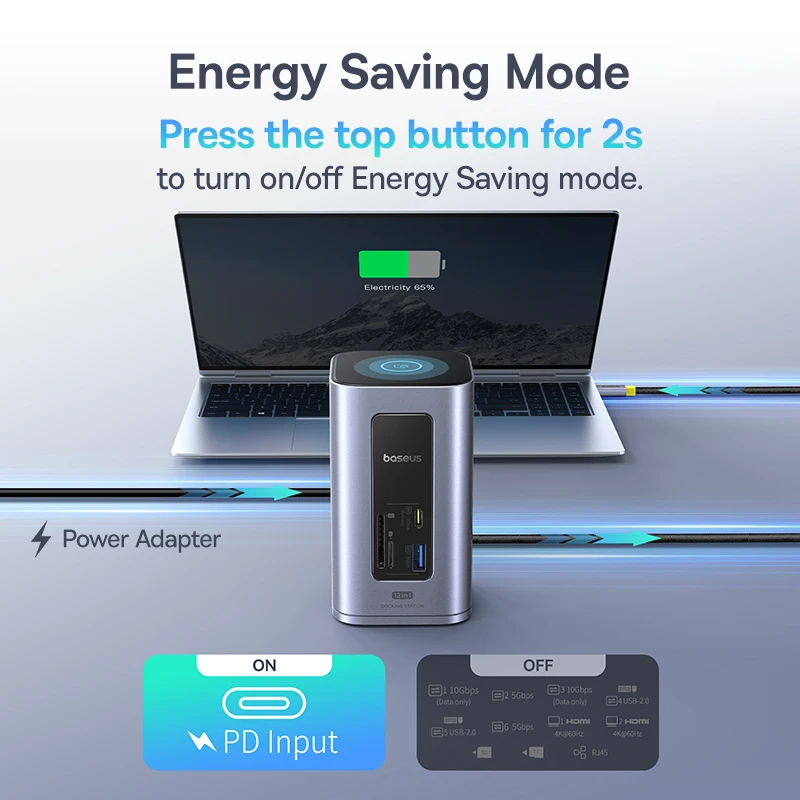
Baseus 12-in-1 USB-C Hub
138 in stock
Price range: $139.85 through $193.28
Your Laptop Has One USB-C Port. You Need Twelve.
Modern laptops are beautiful. Thin. Light. Powerful.
But they have one problem: not enough ports.
One USB-C port for charging. One for your monitor. One for your mouse. One for your hard drive. One for your Ethernet cable. One for your SD card.
You can’t plug everything in. So you unplug. You swap. You compromise. You waste time.
There’s a better way.
Meet the Baseus 12-in-1 USB-C Hub from ChetaXpress. Plug it into your laptop’s USB-C port. Instantly, you have twelve ports.
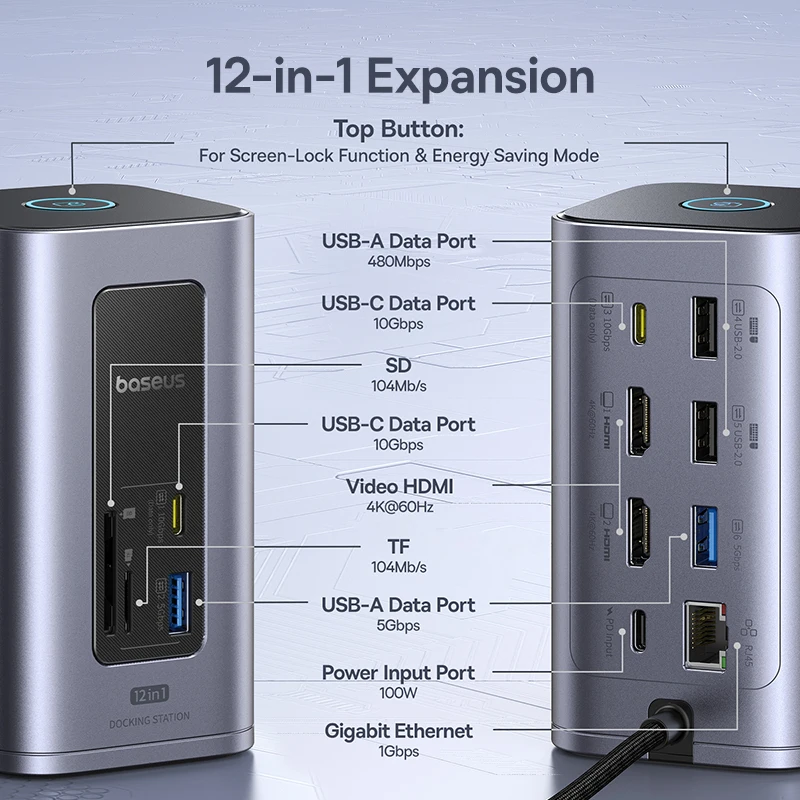
Two 4K HDMI monitors. Two USB 3.2 ports (10Gbps). Two USB-A 3.0 ports. Two USB-A 2.0 ports. Gigabit Ethernet. SD and TF card readers. 100W power delivery passthrough.
One hub. Twelve ports. Zero compromises.
What Makes This Baseus Hub Different?
| Port/Feature | Specification | What It Does For You |
|---|---|---|
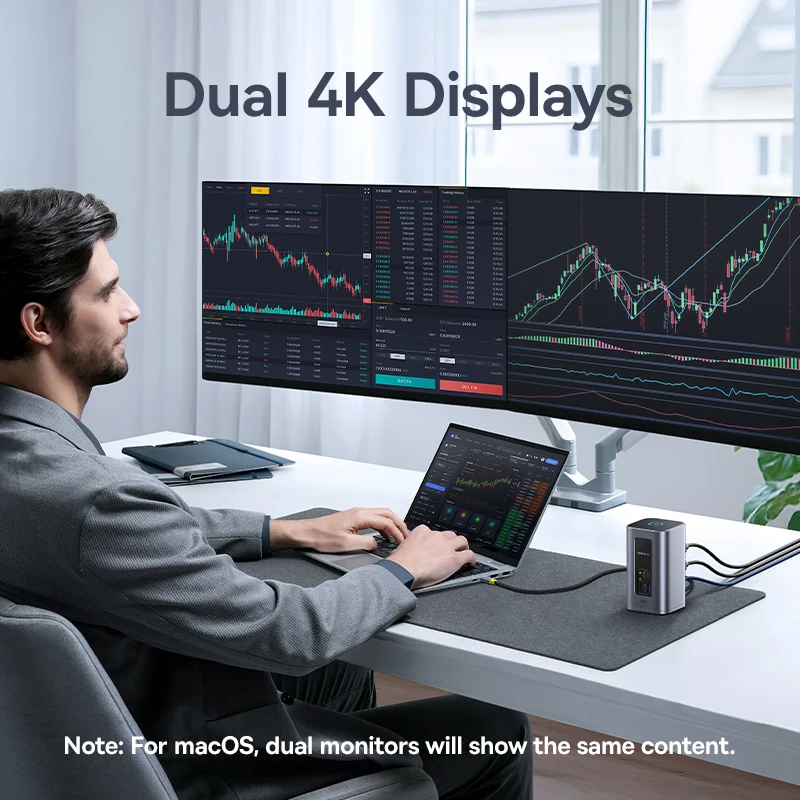
| 2 x HDMI | 4K @ 60Hz (dual display) | Connect two external monitors. Extend or mirror your screen. Perfect for multitasking. |
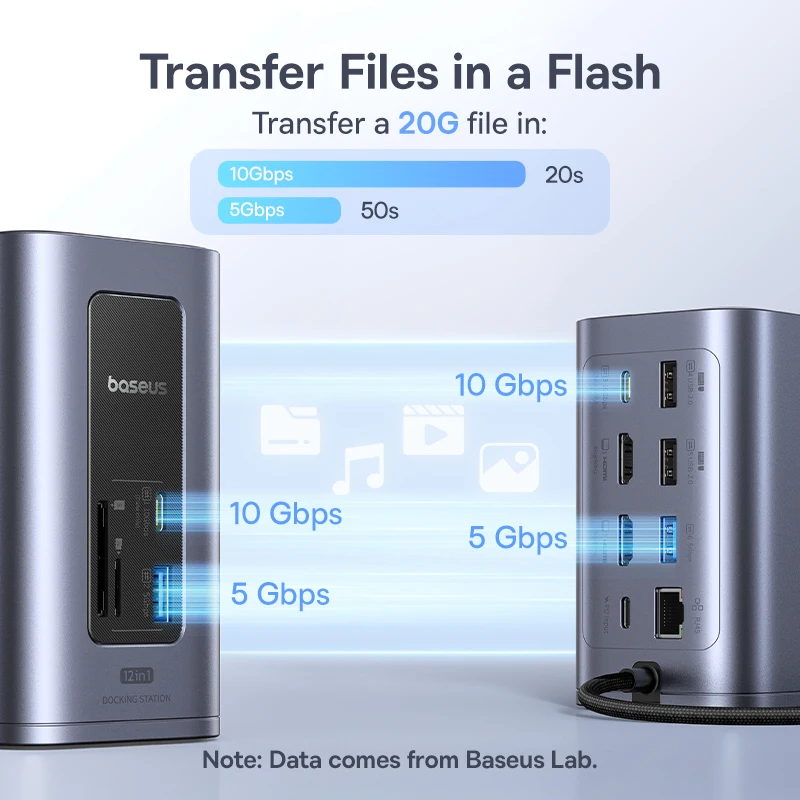
| 2 x USB-C 3.2 | 10Gbps (max) | Ultra-fast data transfer. Transfer large files in seconds. |
| 2 x USB-A 3.0 | 5Gbps (max) | Fast data transfer for external drives, SSDs, and peripherals. |
| 2 x USB-A 2.0 | 480Mbps | Perfect for keyboard, mouse, and other low-bandwidth devices. |
| RJ45 Gigabit Ethernet | 1000Mbps | Stable, fast wired internet. No more WiFi dropouts. |
| SD Card Slot | 104Mb/s | Transfer photos from your camera instantly. |
| TF Card Slot | 104Mb/s | Transfer files from your phone or drone. |
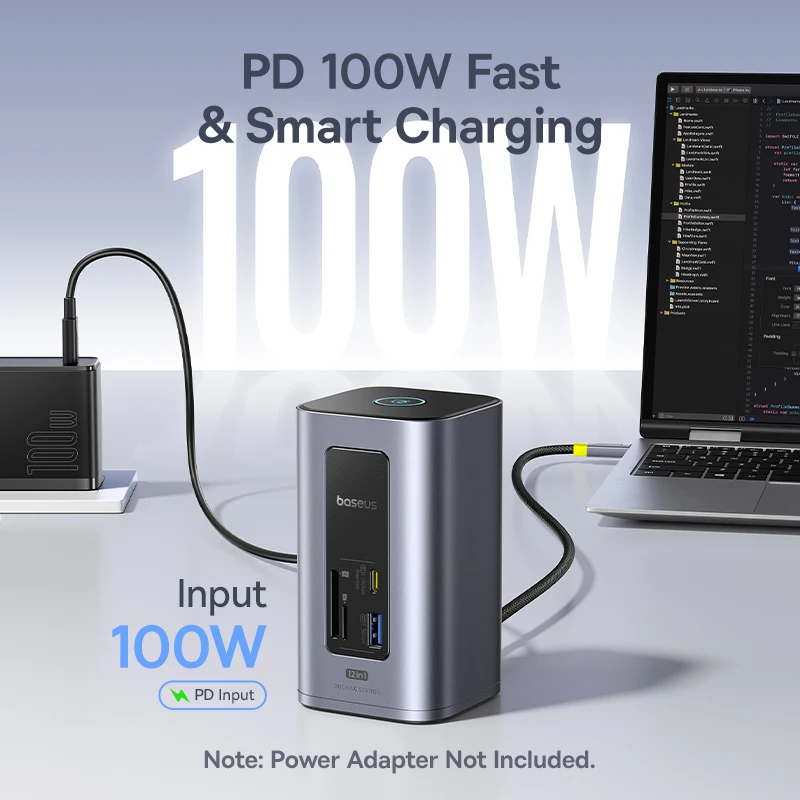
| USB-C PD (Power Delivery) | 100W input (max) | Charge your laptop while using the hub. One cable does it all. |
| Smart Power Management | Automatic | Distributes power efficiently. Protects your devices. |
| One Screen-Lock Function | Privacy feature | Lock your screen with one button. |
| Energy Saving Mode | Power efficient | Reduces power consumption when not in use. |
| Stylish Space-Saving Design | Compact | Sits neatly on your desk. Doesn’t take up space. |
Why 12 Ports? Because You Need Them.
| Use Case | Ports Used |
|---|---|
| Dual Monitor Setup | 2 x HDMI |
| External SSD (fast) | 1 x USB-C 3.2 or USB-A 3.0 |
| External HDD (backup) | 1 x USB-A 3.0 |
| Keyboard + Mouse | 2 x USB-A 2.0 |
| Wired Internet | 1 x RJ45 Ethernet |
| Camera SD Card | 1 x SD Slot |
| Phone TF Card | 1 x TF Slot |
| Laptop Charging | 1 x USB-C PD |
| Free Port for Other Devices | 1 x USB-C 3.2 remaining |
That’s twelve ports. All active. All at once.
Designed for Real Workflows
For Creative Professionals (Video Editors, Photographers, Designers)
Connect two 4K monitors. Edit video across two screens. Plug in your external SSD (10Gbps USB 3.2). Insert your camera’s SD card. Transfer photos at full speed. Charge your laptop. All through one USB-C connection.
For Programmers & Developers
Two monitors for code + documentation + terminal. Gigabit Ethernet for stable connection to servers. USB ports for keyboard, mouse, and debugging tools. One hub. Complete setup.
For Business Professionals
Connect to the projector (HDMI). Plug in your presentation USB drive. Charge your laptop. Use wired Ethernet for video calls. Present with confidence. No fumbling for dongles.
For Students
One hub connects your laptop to the library monitor, your external hard drive, your mouse, and charges your phone. No more “can I borrow a charger?”
For Home Office Workers
Dual monitors for productivity. Ethernet for stable Zoom calls. USB ports for all your peripherals. Clean, organized desk. One cable to your laptop.
Technical Specifications
| Specification | Detail |
|---|---|
| Product Type | USB-C Docking Station / Hub |
| Brand | BASEUS |
| Total Ports | 12 |
| Interface Type | USB Type-C (host connection) |
| Video Output | 2 x HDMI (4K @ 60Hz max) |
| USB-C 3.2 Ports | 2 x 10Gbps (max) |
| USB-A 3.0 Ports | 2 x 5Gbps (max) |
| USB-A 2.0 Ports | 2 x 480Mbps |
| RJ45 Ethernet | Gigabit (1000Mbps) |
| SD Card Slot | 104Mb/s |
| TF Card Slot | 104Mb/s |
| USB-C PD Input | 100W (max) — charges laptop while using hub |
| Smart Features | Power Management, One Screen-Lock, Energy Saving Mode |
| Compatible Systems | Windows, macOS, Linux, Others |
| Certifications | CE, FCC, RoHS |
| High-Concerned Chemicals | None |
| Origin | Mainland China |
Package Contents
| Item | Quantity |
|---|---|
| Baseus 12-in-1 USB-C Hub | 1 |
| USB-C to USB-C Cable (for host connection) | 1 |
| User Manual | 1 |
| ChetaXpress Thank You Card | 1 |
(Power adapter not included — uses laptop’s existing charger via PD passthrough)
Why You Should Get This Baseus Hub — Right Now
Reason 1: Dual 4K@60Hz Displays
Most USB-C hubs support one monitor at 4K@30Hz (laggy, choppy). This hub supports TWO monitors at 4K@60Hz. Smooth video. Smooth mouse movement. Professional-grade multitasking.
Reason 2: 100W Power Delivery (PD)
Plug your laptop’s charger into the hub. The hub powers itself AND passes through up to 100W to charge your laptop. One cable to your laptop. No separate charger needed.
Reason 3: 10Gbps USB 3.2 Ports
Transfer a 10GB file in about 8 seconds. Edit video directly from an external SSD. No waiting. No lag.
Reason 4: Gigabit Ethernet
WiFi is convenient. Ethernet is reliable. No dropouts. No interference. Full gigabit speed for video calls, large downloads, and online gaming.
Reason 5: SD & TF Card Readers
Transfer photos from your camera (SD). Transfer files from your phone or drone (TF). No separate card reader needed.
Reason 6: Smart Power Management
The hub intelligently distributes power to connected devices. Prevents overload. Protects your laptop and peripherals.
Reason 7: One Screen-Lock Function
Press a button. Your screen locks. Privacy in an instant. Perfect for open offices or when you step away from your desk.
Reason 8: Energy Saving Mode
Reduces power consumption when the hub is idle. Lower electricity bill. Longer life for your devices.
Reason 9: Stylish, Compact Design
Looks great on any desk. Matches your MacBook or Windows laptop. Doesn’t take up space.
Reason 10: ChetaXpress Approved
| Standard | How This Product Delivers |
|---|---|
| Impactful | Turns one port into twelve. Eliminates dongle chaos. |
| Seamless | Plug and play. No drivers needed (most systems). |
| Compatible | Works with Windows, Mac, Linux. USB-C laptops. |
| Reliable | Baseus quality. CE, FCC, RoHS certified. |
| Future-proof | 4K@60Hz. 10Gbps USB 3.2. 100W PD. |
Who Is This For?
| You might be… | Why you need this hub |
|---|---|
| A MacBook user | Apple gave you 2 ports. This gives you 12. |
| A Windows laptop user | Most Windows laptops have limited ports. Expand them. |
| A creative professional | Dual 4K monitors + fast storage + SD card reader |
| A programmer | Dual monitors + Ethernet + multiple USB devices |
| A business professional | Present from any laptop. No dongle drama. |
| A student | Connect everything to your laptop. One cable. |
| A home office worker | Dual monitors + Ethernet + peripherals. Clean desk. |
Compatible Devices
| Brand | Models (Examples) |
|---|---|
| Apple MacBook | MacBook Pro (2016+), MacBook Air (2018+), MacBook (2015+) |
| Microsoft Surface | Surface Laptop, Surface Pro (USB-C models) |
| Dell | XPS, Latitude, Inspiron (USB-C models) |
| HP | Spectre, Envy, EliteBook (USB-C models) |
| Lenovo | ThinkPad, Yoga, Legion (USB-C models) |
| ASUS | ZenBook, ROG, Vivobook (USB-C models) |
| Acer | Swift, Spin, Predator (USB-C models) |
| Pixelbook, Pixelbook Go | |
| Other | Any laptop with USB-C port supporting DisplayPort Alt Mode |
Note: Check your laptop’s specifications. USB-C port must support DisplayPort Alt Mode for video output.
How to Set Up (3 Simple Steps)
| Step | Action |
|---|---|
| 1 | Connect the hub to your laptop’s USB-C port using the included cable |
| 2 | Connect your laptop’s charger to the hub’s PD port (optional — for charging) |
| 3 | Plug your monitors, Ethernet, USB devices, and SD cards into the hub |
That’s it. Your laptop now has twelve ports.
Dual Display Setup Guide
| Scenario | What You Get |
|---|---|
| Windows (Extended Mode) | Two external monitors + laptop screen = 3 displays total |
| Mac (Extended Mode) | Two external monitors (laptop screen may be disabled depending on M1/M2/M3 chip — check compatibility) |
| Mirror Mode | Same content on both external monitors |
| 4K@60Hz | Both monitors run at 4K resolution, 60Hz refresh rate |
Note for M1/M2/M3 Mac users: Apple’s M1/M2/M3 chips natively support only one external display. Workarounds exist (DisplayLink software). Check compatibility before purchasing.
Comparison: Baseus 12-in-1 vs Basic USB-C Hub
| Feature | Basic USB-C Hub (3-5 ports) | Baseus 12-in-1 Hub |
|---|---|---|
| Total Ports | 3-5 | 12 |
| HDMI Ports | 1 (often 4K@30Hz) | 2 (both 4K@60Hz) |
| USB Speed | USB 2.0 or 3.0 (5Gbps) | USB 3.2 (10Gbps) |
| Ethernet | Rare | Gigabit (1000Mbps) |
| SD/TF Card Reader | Rare | Yes (both) |
| PD Charging | Sometimes (often 60W max) | Yes (100W max) |
| Smart Power Management | No | Yes |
| Screen-Lock Button | No | Yes |
| Energy Saving Mode | No | Yes |
| Price | Lower | Value for features |
Real Customer Story (Early Review)
*”I have a MacBook Pro with only two USB-C ports. One for charging. One for everything else. I was constantly swapping dongles — HDMI for my monitor, USB for my hard drive, Ethernet for work. This Baseus hub changed everything. I plug in one cable. My monitor, Ethernet, external SSD, keyboard, mouse, and SD card all work at the same time. And it charges my laptop. The dual 4K@60Hz display is smooth as butter. Best tech purchase I’ve made this year.”*
— Jessica L., ChetaXpress customer
Important Notes
| Note | Detail |
|---|---|
| Host laptop requirements | USB-C port must support DisplayPort Alt Mode for video. Most modern laptops do. Check your specs. |
| Power adapter not included | Use your laptop’s existing charger. Plug it into the hub’s PD port. |
| M1/M2/M3 Mac limitation | Apple Silicon Macs natively support only one external display. Research DisplayLink workarounds if you need two. |
| Driver installation | Most functions are plug-and-play. Some features (Ethernet, dual display on Mac) may need drivers. |
| USB-C cable included | Yes, cable for host connection is included. |
| Heat | Normal for multi-port hubs to be warm during heavy use. Baseus design dissipates heat effectively. |
30-Day Risk-Free Guarantee
Don’t love it? We’ll refund you. No questions asked. You have 30 days from delivery to try it in your setup.
That’s the ChetaXpress promise.
Ready to Expand Your Laptop’s Capabilities?
Your shortcut to a complete desktop setup starts here.
There are no reviews yet.